
[ ENTERING_THE_TREASURY ]
BVT BANK BVT · BVUSD · BVINR · BitVault L1 Your BitVault treasury, in a wallet only you control.
- 1 $WALLET_ON_EVERY_DEVICE
- 12 $WORDS_ONLY_YOURS
- 3 $PLATFORMS
- $0 $TO_USE
"Your keys. Your coins. Every device."
BVT BANK keeps BVT, BVUSD and BVINR in a wallet that only you hold: 12 words made on your device, locked with a password you choose, and the same addresses on your phone, your PC and in the browser. Sends are signed on your device and go straight to the BitVault chains. BitVault never sees your words and cannot move your coins.
Free to use · Network fee paid in BVT · Built by BitVault
SCROLL_TO_ENTER[ /LIVE_TREASURY ]
The treasury board
The coins BVT BANK holds for you, read live from the BitVault chain by your own browser: price, how many exist, how many sit in the BitVault treasury, and how many are out with people.
 BVTBVM20 · NATIVE————GAS COIN
 BVUSDBVM20 · TOKEN————AUTHORIZED
 BVINRBVM20 · TOKEN————AUTHORIZED
BVT on L1BITVAULT L1 · BV1Q…————RECEIVE ONLY
Numbers come from rpc.bitvault.club and prices.bitvault.club while you look at this page. "Authorized" means the coins were created in the treasury wallet but not issued to anyone; "Circulating" is what is outside that wallet. BVT on BitVault L1 can be received now and sent after the L1 opens on 7 February 2027.
[ /FIRST_SEND ]
Your first five minutes
Five steps, the same on a phone, a PC or in the browser. Nothing to configure, no network to add, no seed phrase to type on a new device.
- ◆ Step 1
/ACCOUNT/
Create your account
Email and password, or Google. The account only holds your name and an encrypted copy of your wallet. Nothing else.
⚡ 30 seconds✓ Free - ◆ Step 2
/WALLET/
Make your wallet
12 words are made on your device. Write them down, confirm three of them, choose a wallet password. Or import words you already have.
⚡ On your device12 or 24 words - ◆ Step 3
/RECEIVE/
Receive
Your BVM20 address (0x…) and your BitVault L1 address (bv1q…) with QR codes. Ask someone to pay you with a request QR.
⚡ QR codes✓ Two chains - ◆ Step 4
/SEND/
Send
BVT, BVUSD, BVINR, USDT.bv or USDC.bv on BVM20. The fee is paid in BVT and is tiny. A new wallet with no BVT asks the Gas Starter for a free first drop.
⚡ Signed on deviceFee in BVT - ◆ Step 5
/ACTIVITY/
Watch it land
Every send is logged with a link to the BitVault explorer. Export your activity as CSV. Put coins in named pots to plan, without moving them.
⚡ Explorer links✓ CSV export
PBKDF2-SHA256 · 310,000 rounds then AES-256-GCM. The password never leaves your device.0x… and bv1q… addresses.[ /SELF_CUSTODY ]
Only you hold the keys
BVT BANK is a treasury, not a custodian. Your coins sit at addresses that only your 12 words can move. We built the app so that we cannot touch them even if we wanted to.
- Sends are signed inside your browser or app and broadcast straight to the BitVault chain. No BitVault server stands in between.
- Your account stores an encrypted copy of your words so the same wallet opens on every device. The password that opens it stays with you.
- The wallet locks by itself after ten minutes without you, and whenever you sign out.
- Lose the 12 words and the password together, and nobody can recover the coins. That is the price of real ownership, and the app says so before you start.
[ /RESERVES ]
Reserves you can check
The Reserves tab reads the chains in front of you. It shows what is there, and says plainly what is not.
- BVUSD on BSC is created only by the public vault, one BVUSD for each USDT put in. The USDT stays in the vault contract and the app shows its balance live.
- BVUSD and BVINR on BVM20 were created in the BitVault treasury wallet and are authorized, not issued. They are not backed by a reserve until they are issued against one, and the app says that.
- BVINR has no rupee reserve. Its number is a target, not a promise.
- BVT is priced by BVT Swap, not pegged to anything. Prices in the app come from prices.bitvault.club and can move.
Readings refresh every 60 seconds while this page is open.
[ /PLAIN_WORDS ]
Not a bank. A treasury.
The name says BANK because it is where you keep and move your BitVault coins. It does not take deposits, hold money for you, lend, pay interest or issue cards, and nothing in it is insured. If a screen ever says otherwise, it is a bug: tell us.
- 0
- Fiat accountsno rupee or dollar balances, no bank transfers in or out
- 100%
- Your keysevery coin sits at an address only your 12 words can move
- $0
- To useno plans, no subscription; you pay only the chain's fee in BVT
[ /SOFTWARE ]
The software itself
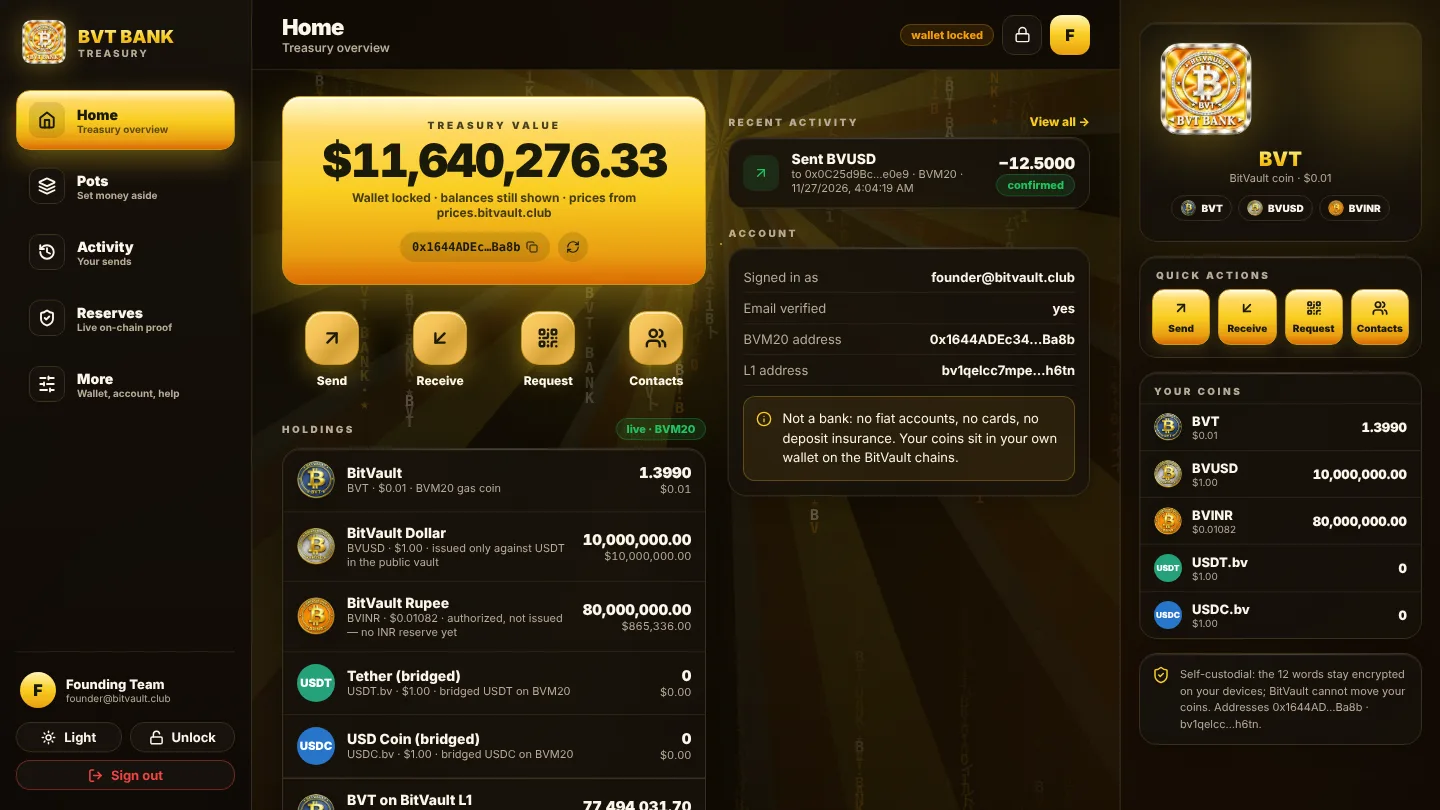
Real screens of BVT BANK 1.1, taken on a PC with live chain data. The phone shows the same screens, laid out for one hand.
[ /PRICE ]
Free. No plans.
BVT BANK costs nothing to use. The only thing you ever pay is the BitVault chain's own network fee, in BVT, and it is very small.
The app
$0
browser, Windows and Android
Forever
Account
$0
email or Google
Network fee
BVT
a tiny amount per send, set by the chain
First fee
0.02 BVT
a free one-time drop from the Gas Starter for new wallets
Free
No subscription, no premium tier, no fee taken by BitVault on sends. If that ever changes, it will be written here first.
Prices shown inside the app come from prices.bitvault.club and are information, not an offer to buy or sell.
[ /PLATFORMS ]
Browser, Windows and Android
One account, one wallet, three ways in. The Windows app keeps the app on your PC with a desktop icon. The Android app installs from this page. Any other phone or computer uses the browser.
/BROWSER/
Run in the browser
Chrome, Edge, Firefox, Safari. Nothing to install. Add it to your home screen and it opens like an app.
▶ Run in the browser/WINDOWS/
Windows app
A one-click installer, no admin rights, a desktop and Start menu icon. Windows 10 and 11, 64-bit.
Download for Windows/ANDROID/
Android app
Full screen, with the same account. Android asks once to allow installing from the browser.
Download for Android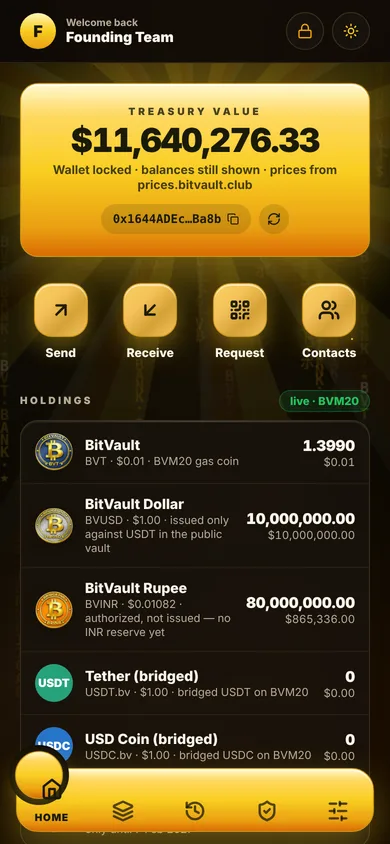
[ /FAQ ]
Questions
Is BVT BANK a bank?
No. It is a self-custody treasury app for BitVault coins. There are no fiat accounts, no cards, no lending, no interest and no deposit insurance. Your coins sit in a wallet that only you control.
Where are my coins, really?
On the BitVault chains, at addresses derived from your 12 words: a 0x… address on BVM20 (chain 31338) and a bv1q… address on BitVault L1. The app shows them; it does not hold them. You can check any balance on explorer.bitvault.club.
How is the same wallet on my phone and my PC?
When you make the wallet, your device encrypts the 12 words with the wallet password you choose and keeps that locked copy in your account. On a new device you sign in, type the wallet password, and the same wallet opens. The password itself is never sent anywhere.
What if I lose the 12 words or the wallet password?
With the wallet password you can show the words again inside the app, so write them down on paper. If you lose both, nobody can recover the coins, including BitVault. The app warns you about this before it makes the wallet.
Can BitVault see my words or move my coins?
No. The words are made on your device and only an encrypted copy reaches your account. Every send is signed on your device. BitVault's servers are never asked to sign anything.
What is BVUSD backed by?
On BNB Smart Chain, BVUSD is created only by the public vault, one for each USDT put in, and the USDT stays in the vault contract. The BVUSD on BVM20 was created in the BitVault treasury wallet and is authorized, not issued: it is not backed by a reserve until it is issued against one. The Reserves tab shows both numbers live.
And BVINR?
BVINR is authorized, not issued, and there is no Indian-rupee reserve behind it. Its figure is a target the project works towards, not a promise. The app says so wherever BVINR appears.
Can I send on BitVault L1?
Not yet. You can see your bv1q… address and its balance, and receive to it. Sends on the L1 open when the chain opens on 7 February 2027. Sends on BVM20 work now.
What does a send cost?
Only the network fee, paid in BVT, and it is tiny. A brand-new wallet with no BVT can ask the Gas Starter for a free one-time 0.02 BVT so its first token send goes through. BitVault takes no fee of its own.
Which devices?
Any modern browser; a Windows app (Windows 10 or 11, 64-bit); an Android app (Android 7 and up). On iPhone and Mac, use the browser and add the page to your home screen. There is no Chrome extension.
Does Google sign-in change anything?
No. Google only proves your email. The wallet is still yours, encrypted with your own wallet password. You can also sign up with just an email and a password.
Can anyone use it?
Yes, anywhere in the world, in English for now. More languages are coming. Using crypto may be regulated where you live; that is for you to check.
[ /CONTACT ]
Talk to us
A question, a problem, or something on a screen that does not look right. Write to the BitVault Founding Team.